








How to Use the "Moving Grid" Feature in Futures Grid
To help you better capture trading opportunities in a rapidly changing market, Phemex has launched our new "Moving Grid" feature! This upgrade addresses the pain points of traditional grid trading in trending markets. You no longer need to manually stop and recreate grid bots. Now the system automatically adjusts the range for you to continuously adapt to volatility and enhance bot flexibility! Empower your automated trading bots to handle both oscillating markets and trending markets with ease.
New to Moving Grid? Start your first bot in minutes → https://phemex.com/trading-bots?type=CONTRACT_GRID
I. What is Moving Grid?
Moving Grid is an intelligent upgrade to the traditional futures grid bot. It features a grid range that is no longer fixed but can automatically shift upward or downward based on market price movements.
-
It avoids selling all holdings too early in a rising market ("missing out").
-
It avoids depleting funds too early in a falling market for short strategies.
You can think of it as a smart fishing net that automatically moves with the flow of the fish (price movement).
-
If the price rises, the grid shifts upward.
-
If the price falls, the grid shifts downward.
II. What are the advantages of Moving Grid?
Dynamic Tracking, Never Miss Out
Once enabled, the grid range automatically follows price movements closely.
-
Shifts upward during rallies to not miss subsequent highs.
-
Shifts downward during declines to not miss accumulation opportunities.
Enhance Returns & Boost Profits
Extends the effective lifespan of the grid in trending markets, increasing the number of trades and potentially improves overall grid arbitrage profits.
Intelligent Response & Risk Mitigation
Sometimes market price breaks through the original grid range. Moving Grid effectively reduces this "grid break" risk by making your bot more resilient during wide oscillations and in the early stages of a trend.
III. How does Moving Grid work?
The system shifts the entire grid upward or downward when the market price breaks and remains beyond the grid's boundaries.
-
Upward Adjustment: If price breaks above the upper boundary and remains there, the system recognizes an uptrend and shifts the entire grid upward by one or more grid intervals.
-
Downward Adjustment: If price falls below the lower boundary and stays there, the grid shifts downward to follow the trend.
-
All pending buy and sell orders within the original grid will move along with the adjustment.
For more details, please check the video below:See it in action — Launch Moving Grid Bot
IV. Applicable Scenarios & Users
Applicable Scenarios
-
Wide-Ranging Oscillating Markets
-
Early Stages of Trending Markets
-
Highly Volatile Trading Pairs
Suitable For
-
Conservative Investors: Reduces risk and protects capital in strong trending markets through automation
-
Time-Limited Users: No need for frequent manual adjustments; leverages automation for significantly improved trading efficiency
-
Intermediate/Advanced Traders: Those with certain market analysis skills can flexibly set and adjust Moving Grid parameters based on market outlook
V. How to Create Your First Moving Grid?
Supported Bot Types: Futures Grid (Long, Short, Neutral).
Creation Methods:
- Manual Creation
Copy from recommended free bots (Copies Moving Grid parameters, but does not copy Auto-Transfer Margin parameters)

Step 1: Create Grid Bot
Navigate to Trading Bot - Futures Grid, select [Manual], and set your initial grid price range, number of grids, investment amount, leverage, etc.
Step 2: Enable Moving Grid
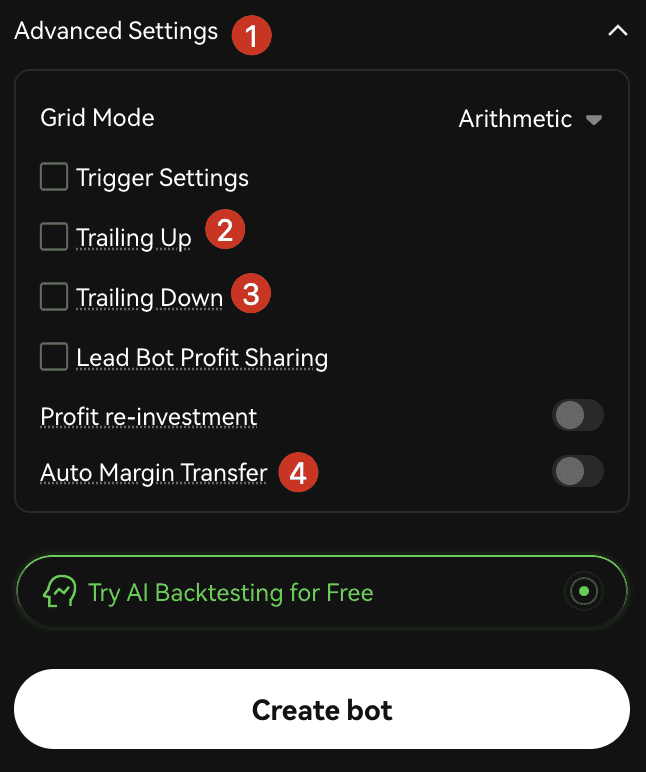
In [Advanced Settings], find and enable "Moving Grid". Set the maximum and minimum upward and downward shift levels.
- Note: It is recommended to also enable Auto-Transfer Margin to ensure sufficient capital.
Step 3: Confirm & Start
Carefully review parameters and start the bot. The system will automatically manage grid movements when conditions are met.
Step 4: How to Stop

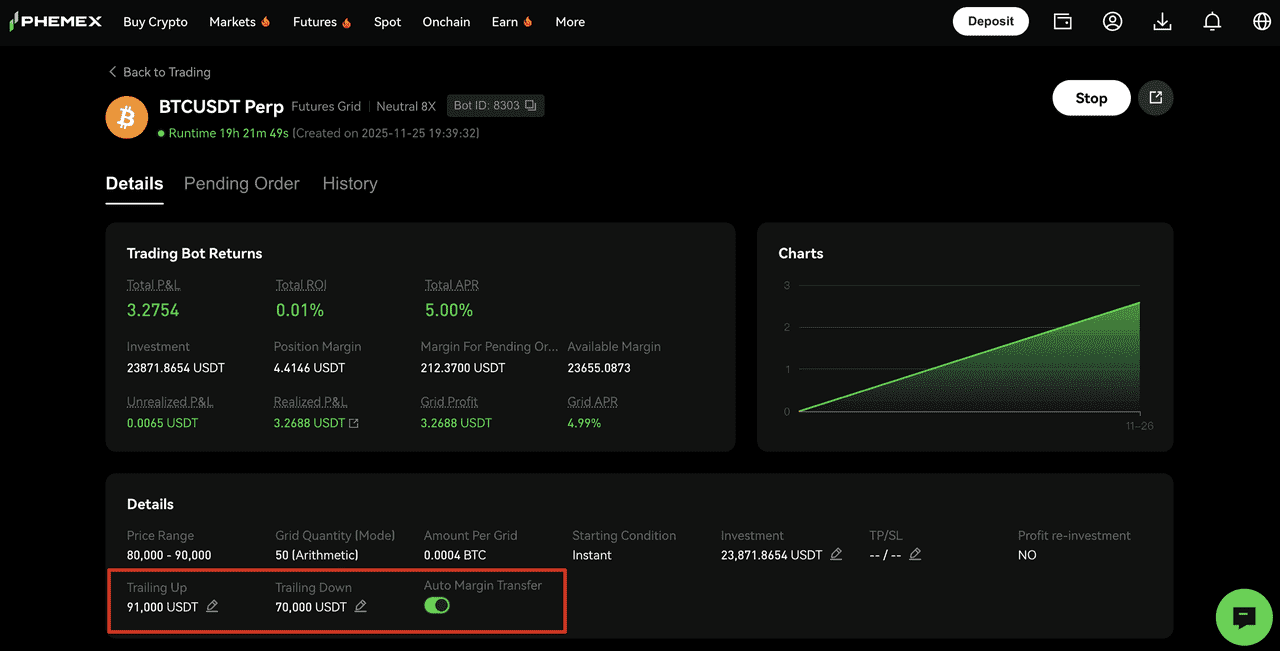
Users are able to stop a running bot, modify price boundaries, or directly cancel planned upward/downward shifts.
- Note: Moving Grid parameter fields are not displayed in the bot list. You can view and modify relevant parameters in the [bot Details] page.
Capital Protection Mechanism
This update introduces a dynamic order mechanism. If account funds are insufficient for new orders when moving the range, the bot cancels the order(s) farthest from the current market price until sufficient funds are released. This improves capital allocation by freeing up capital from less efficient orders. Therefore, the number of active grids may change and may be equal to or less than the initial number.
VI. Risk Disclosure & Important Notes
Auto-Transfer Margin Mechanism:
If enabled when the bot account risk ratio meets or exceeds 85%, the auto-transfer function triggers. The system will move margin from your contract account to the bot account.
-
Single Transfer Amount Formula: Entry Price × Position Size ÷ Leverage (i.e., the Initial Margin (IM) for the position).
-
In some cases, the margin ratio might rise too quickly to the liquidation level before auto-transfer can be triggered.
Ensure your contract account has sufficient funds available to avoid liquidation due to failed margin transfers.
Risk Management Warning: This feature does not guarantee investment returns. Users should make prudent decisions based on their own risk tolerance.
The Moving Grid represents a more powerful and flexible trading tool due to its elevated automation and adaptability. Whether you're aiming to control risk, save time, or capture better returns, it offers a significantly improved experience over traditional grid trading!
Risk Warning: Moving Grid bots do not completely avoid market risks. Investors should trade cautiously based on their investment experience and risk tolerance.
 Submit Ticket