








If your deposited funds haven’t arrived in your Phemex account, you can apply for self-service recovery to retrieve them. A dedicated team will meticulously examine each application to assess the feasibility of recovery.
What transactions are eligible for self-service recovery?
-
The transaction is deposited into your account:
You can only request self-service recovery for crypto deposited into your Phemex account.
-
The transaction is marked as “confirmed/success” on the blockchain:
Please only submit applications for transactions that are marked as “confirmed/success” on the blockchain. We cannot assist you if the transaction is marked as “unconfirmed” or “failed”.
Check the transaction status via the relevant withdrawal platform to see if it shows “completed/arrived”. If it shows as “unconfirmed” or “failed”, please contact the relevant platform for further assistance.
-
The transaction doesn’t contain a tag or memo:
A tag or memo is a unique identifier assigned to each account for identifying a deposit and crediting the appropriate account. When depositing certain crypto, such as XRP,XLM,TON, ATOM etc., you need to enter the respective tag or memo for it to be successfully credited.
If you forget to fill it in, you may try applying to retrieve uncredited deposit.
-
Chose the wrong network and deposited to wrong address:
Both Coin and Chain are supported in Phemex, but users selecting the incorrect chain may result in an erroneous deposit address.
-
Deposited a delisted coin
For certain unlisted tokens, we do support retrieval via the smart retrieval method.
How to use self-service recovery to retrieve my funds?
Step 1: Access the Self-Service Refund Page
-
Log in to your Phemex account.
-
Click on your profile icon in the upper-right corner and choose Deposit.
-
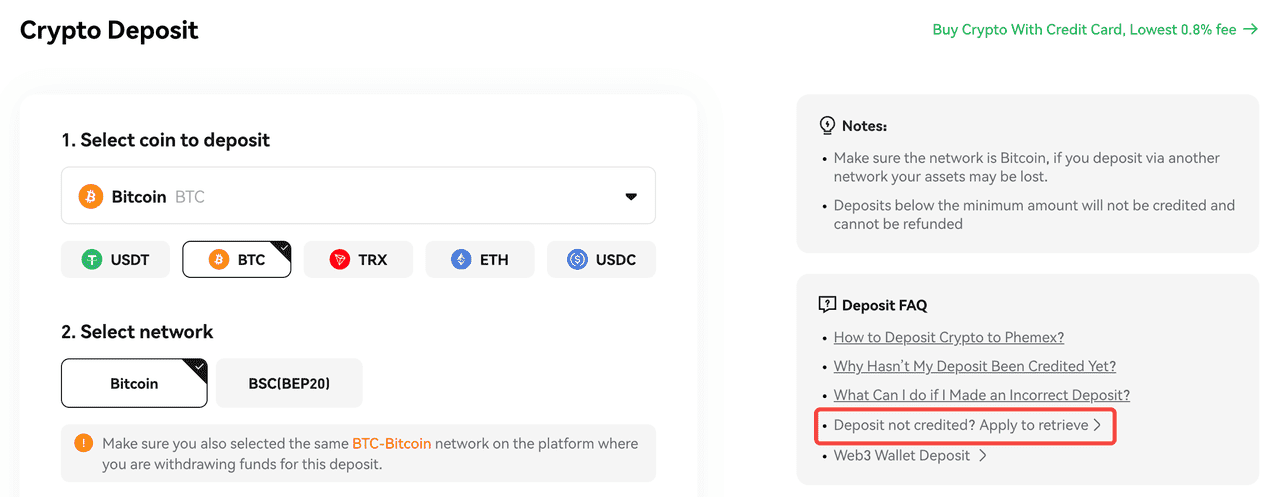
Click [Deposit not credited? Apply to retrieve] located at the bottom-right corner of the page.
Step 2: Select the reason why the deposit was not credited
-
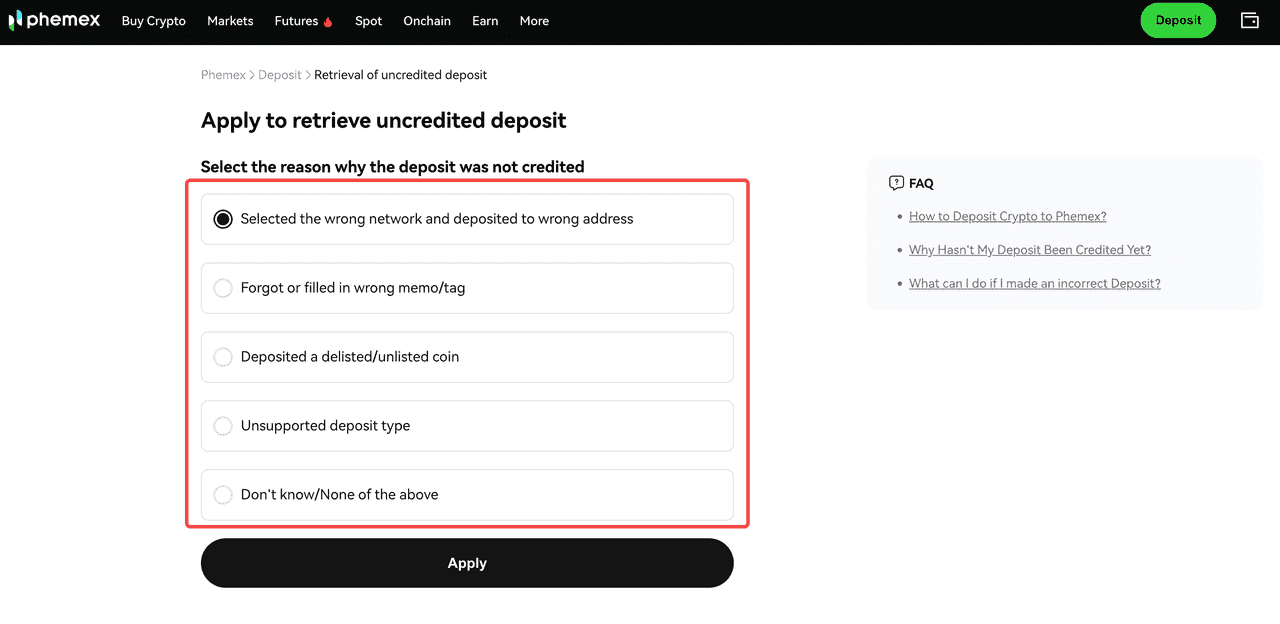
Select the correct reason. If you are unsure, please consult Phemex customer service support@phemex.com.
-
Click [Apply] to proceed.
Step 3: Complete the Refund Form
-
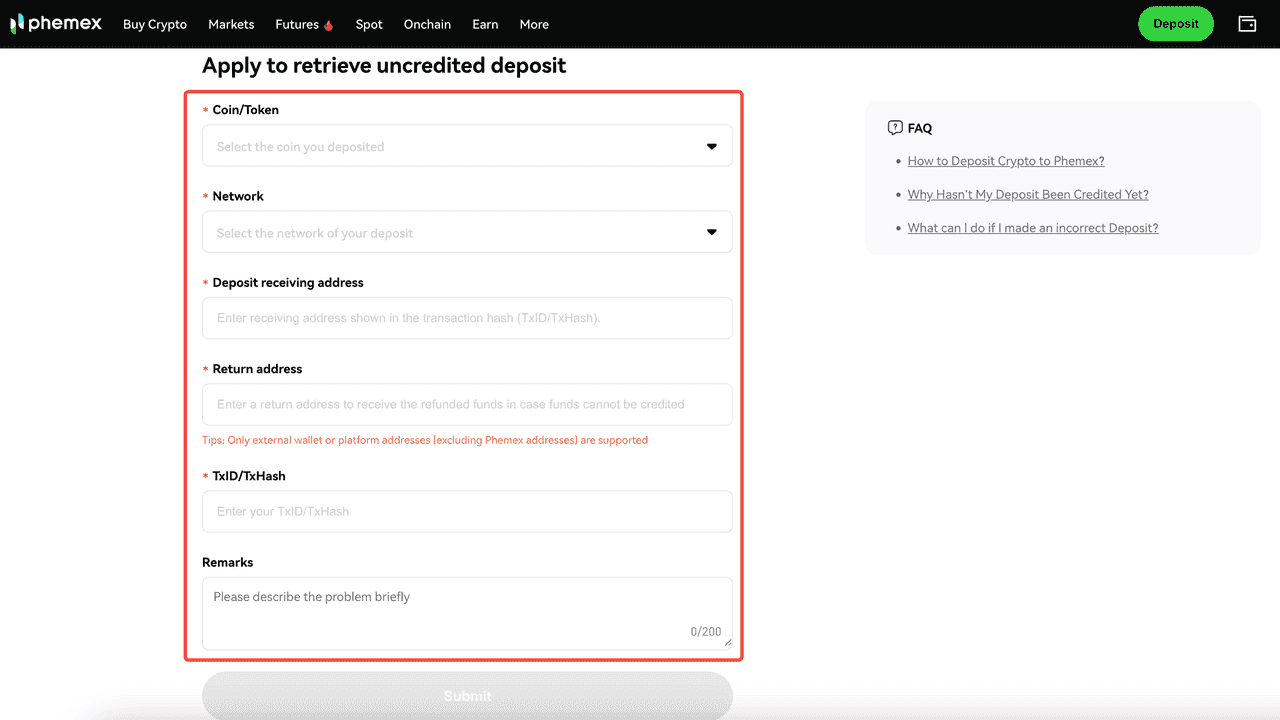
Select the Coin:
-
Use the dropdown menu or search bar to find the coin you deposited.
-
Select Deposit Network/Chain:
-
Note: Select the network used for your incorrect deposit.
-
Confirm this with your withdrawal platform or via the transaction ID (TXID) on blockchain explorers.
-
Enter Phemex Deposit Address:
-
Enter the address according to what is shown on the blockchain page. For deposit addresses, please refer to the “to address” (it might be shown as “destination address”, “receiver” or other similar description on some blockchains).
-
Provide a Return Address:
-
Enter a return address to receive the refunded funds in case funds cannot be credited.
-
Enter Transaction ID (TXID):
-
TxID/TxHash is an identification number that labels each transaction on the blockchain. The TXID is available in your sending wallet's transaction history or on the blockchain explorer used for the transaction.
Note:TXID is a string, not a webpage URL.
-
Add Remarks:
-
Briefly explain the issue and circumstances of the incorrect deposit.
Step 4: Submit the Application
-
Review all information for accuracy.
-
Click Submit to send your request.
Step 5: Check Retrieve History
-
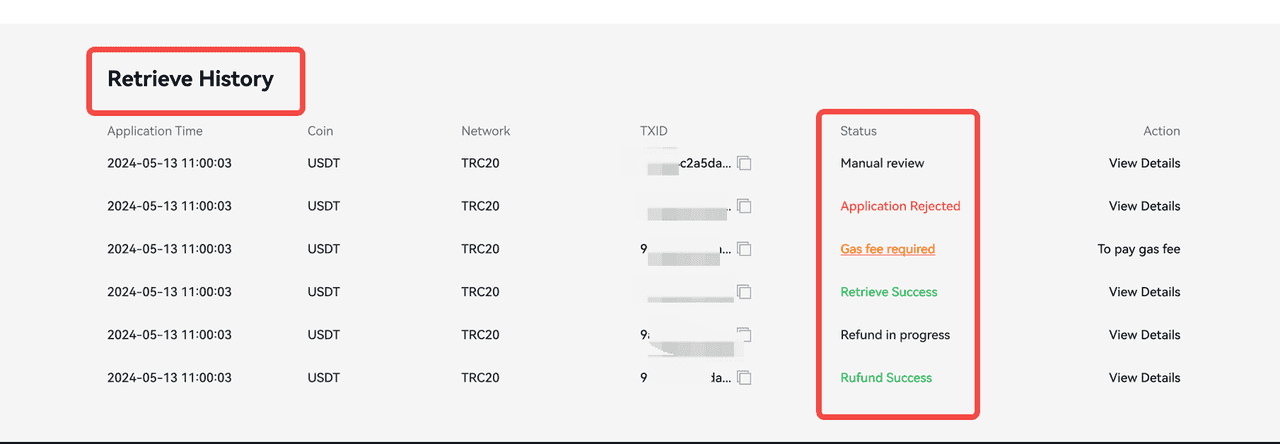
Below the “Retrieval of uncredited deposit” page, you may view retrieve history. After submitting your application, please monitor its status.
-
Note: Certain scenarios may require you to cover the gas fee; for specifics, please click "View Details"
Important to Know
-
Pay the Gas Fee: Certain scenarios require users to cover the gas fee. Please monitor your email and the Phemex page for retrieval status updates. Failure to pay the gas fee via the address provided by Phemex will result in a failed refund.
-
Eligibility: Not all deposits are eligible for refunds. Phemex strives to assist users but cannot guarantee recovery in all cases.
-
Processing Time: Applications may take up to 10 working days to process, depending on the case's complexity and provided information's accuracy.
-
Accuracy: Providing precise information accelerates the refund process.
 Submit Ticket