








What is Phemex Card?
Phemex Card is a Mastercard virtual debit card designed to bridge the gap between crypto assets and everyday spending.
You can add the card to popular mobile payment platforms such as Apple Pay and Google Pay, and use it at millions of online and offline merchants worldwide.
With Phemex Card, you can pay directly using USDT or USDC stablecoins from your Phemex account in real time. Whether you are paying for dining, travel, or subscription services, Phemex Card offers a secure and convenient global payment experience.
Preparation Before Adding Your Card to a Digital Wallet
Before adding your card to a digital wallet (such as Apple Pay or Google Pay), you will need to obtain your Phemex Card details, including the card number, expiration date, and CVV security code. These details will be required during the card binding process.
How to Get Your Card Details
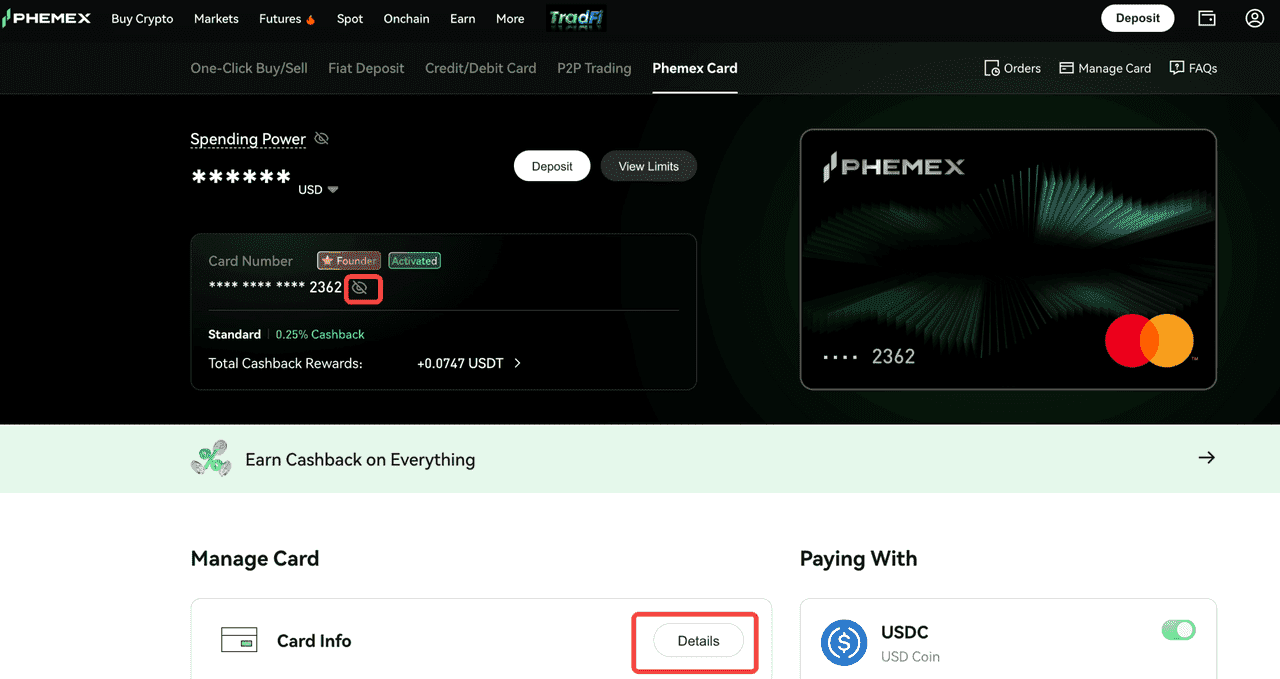
1.Open the Phemex Card page
App: Tap “Phemex Card” on the homepage.
Web: On the Phemex homepage, click “Buy Crypto” → “Phemex Card.”
2.Access your card information After entering the Card page, click “Card Info” → “Details.” Complete the security verification, and you will be able to view your card details, including:
Card Number
Expiration Date
CVV Security Code
How to Add Your Card to Apple Pay or Google Pay
Apple Pay
-
Open the Wallet app on your iPhone and tap the “+” icon in the top-right corner.
-
Select “Add Debit or Credit Card.”
-
Manually enter your Phemex Card details.
-
Review and agree to the terms, then complete SMS or email verification.
-
Your card will be successfully added to Apple Pay.
Supported devices:
-
iPhone 6 or later
-
Apple Watch
-
iPad
-
Mac
Google Pay
-
Open the Google Pay app and tap “Payment.”
-
Select “Add a payment method.”
-
Manually enter your Phemex Card details.
-
Review and agree to the terms, then complete SMS or email verification.
-
Your card will be successfully added to Google Pay.
Supported devices: Devices running Android 7.0 or later with NFC capability.
⚠️ Important Notice:
-
Please keep your Phemex Card details (including your card number, CVV, and expiration date), your devices, and your authentication methods (such as biometric authentication or authentication tokens) secure to prevent unauthorized use of your card and related information.
-
Phemex staff will never proactively ask for your full card details. If you receive such a request, please remain vigilant and verify the request through official Phemex channels.
FAQs
Q: Which cryptocurrencies are supported by Phemex Card? Which account will be used for payments, and what is the deduction order?
A: Currently, Phemex Card supports payments using USDC and USDT from your Spot Account only. Other cryptocurrencies are not supported at this time.
When a transaction is initiated, the deduction will follow the payment currency order you have set. If you have not configured a payment priority, the default order is: USDC → USDT.
Q: What are the transaction fees for Phemex Card?
A: For detailed information on fees and charges, please refer to “Phemex Card Fees and Limits.” If there are any updates, please refer to the official announcement for the latest information.
Q: Why did my wallet binding fail right after applying for a Phemex Card?
A: Some digital wallets may request a small verification charge to confirm the validity of your card.
We recommend transferring a small amount of USDC or USDT to your Phemex Spot Account before attempting to add your card again.
Q: Why was my transaction declined?
A: Your transaction may be declined for the following reasons:
Insufficient account balance
Exceeded spending limits (please check your card limits in the app)
Merchant restrictions (the merchant does not allow this type of transaction)
High-risk transaction (the transaction has been flagged as high risk)
If you believe your transaction was declined due to an error, please contact our customer support team for assistance.
Q: How are refunds processed?
A: If a refund occurs, the refunded amount will be credited to your Spot Account in USDC.
Note:
Transaction Fees: Once a transaction is completed, the original transaction fee will not be refunded, even if the order is refunded.
Cashback Adjustment: If the order is refunded, the system will automatically deduct the corresponding cashback proportionally based on the refunded amount.
Q: How can I view my transaction history?
A: You can view your recent transaction history at the bottom of the Phemex Card homepage.
Click Transactions → View All to access the full transaction page, where you can view or download all payment records.
Q: What should I do if I notice a transaction that I did not authorize?
A: If you notice a transaction that you did not initiate, please follow these steps immediately:
Freeze your card: Go to the Phemex Card page and freeze your card to prevent further unauthorized transactions.
Check recent transactions: Review your recent transactions to identify any other suspicious activity.
Report the unauthorized transaction: Contact our customer support team and report the suspicious transaction through the “Report” option.
Follow up: Our support team will guide you through the dispute process and help secure your account.
Q: What should I do if I want to dispute a transaction?
A: If you have a dispute regarding a transaction, contacting the merchant is usually the fastest way to resolve the issue. Once the merchant initiates a refund, it may take up to 14 business days for the refund to be processed.
If the issue remains unresolved, please contact our customer support team. We will assist you in initiating the dispute and arbitration process with the card network.
-
Dispute filing fee: 25 USD
-
Arbitration fee: The exact fee will be communicated by **Mastercard before the arbitration process begins.
 Submit Ticket