








Introduction
Futures Martingale Trading Bots are automated systems designed to implement the Martingale strategy by enlarging your futures contract position following a loss, intending to secure profits upon a favorable market reversal.
The fundamental concept involves doubling the investment after each loss with the goal of recovering prior losses and achieving a profit equal to the initial investment. This strategy operates on the assumption that a winning trade will eventually occur after a series of losing trades, effectively covering the accumulated losses and generating a profit.
To establish a Futures Martingale bot, you must configure specific parameters outlining your trading approach for the bot to implement. This guide assists you in understanding the parameters involved in setting up a Futures Martingale bot.
Order Window
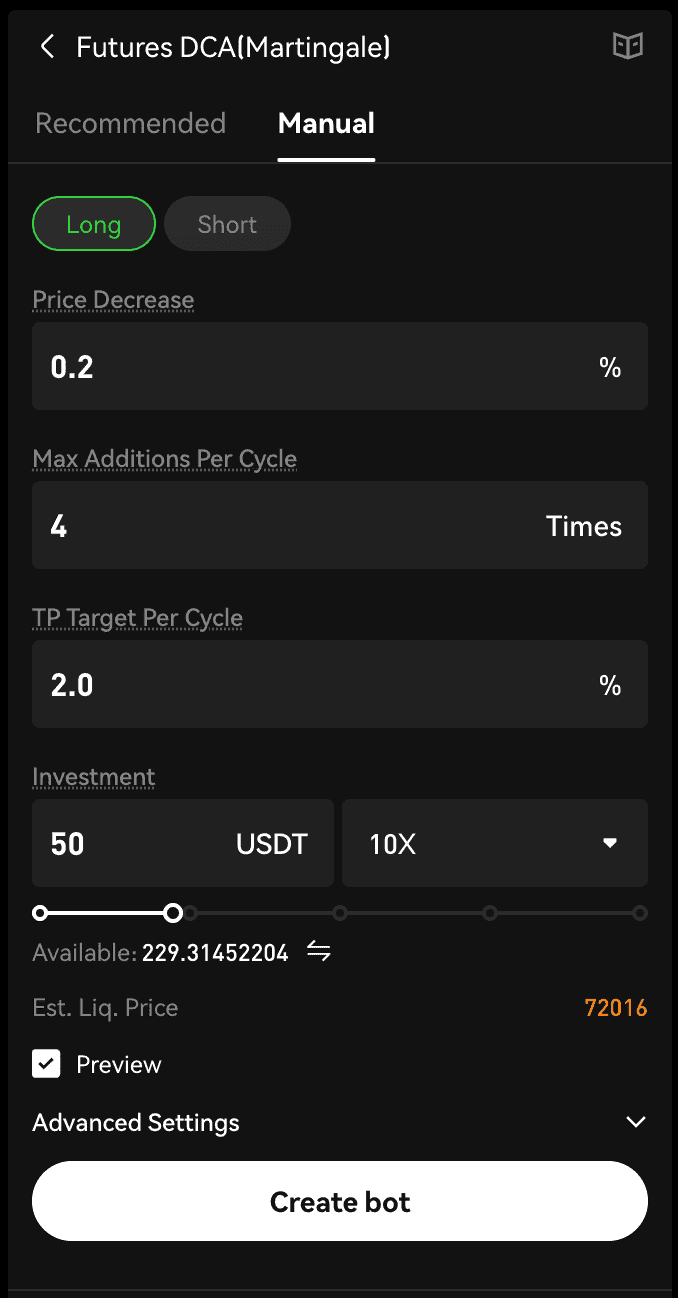
Within the Futures Martingale Bot interface, you're presented with two modes for bot creation: Recommended and Manual. Opting for Recommended Mode allows direct parameter copying, requiring only the investment amount input to finalize the setup. For tailored bot design, switch to the 'Manual' tab in Trading Bot Mode. Here, select a strategy (long or short) aligned with your market analysis, and specify parameters alongside the investment amount in USDT.
Parameter Explanation
|
Parameter
|
Explanation
|
|
Price Decrease (Long) or Price Increase (Short)
|
Triggers an addition to your open position when the market price falls by a specified percentage, e.g., a 1% fall triggers an additional Open Long or Short order depending on your direction.
|
|
Max Additions Per Cycle
|
Indicates the maximum number of times you can increase your position in a trading cycle. Actual additions depend on the available margin.
|
|
TP Target Per Cycle
|
- Long position: Take profit price = Average position cost × (1 + Take profit %)
- Short position: Take profit price = Average position cost × (1 - Take profit %)
When the TP price is triggered and the order is fully executed, the bot will end the current cycle index and start the next one as specified.
|
|
Investment
|
The actual amount invested into this trading bot will be used only for this bot after activation.
|
|
Leverage
|
The default leverage is 10X, and the maximum leverage is limited by the lowest risk limit of the corresponding trading pair. Leverage modification is supported.
|
Advanced Details
|
Parameter
|
Explanation
|
|
Trigger Price
|
Optional — The bot will not start running until the price reaches it.
|
|
Stop Loss
|
Optional — The bot will be terminated after the price hits it. The Stop Loss ratio denotes the percentage of the highest allowable loss a trader is prepared to endure in relation to the initial investment sum.
|
Safety Order Details
|
Parameter
|
Explanation
|
|
Price steps multiplier
|
Applied to the price step for placing the next safety order. It increases or decreases the price gap between safety orders.
For example, with a price step = 1%, multiplier = 2. Safety orders will be placed when the price changes 1% × 2^(1-1) = 1%, 1% × 2^(2-1) = 2%, 1% × 2^(3-1) = 4%, etc.
|
|
Amount multiplier
|
Applied to the investment amount for placing the next safety order. It affects the aggressiveness in averaging the entry prices of your investments.
For example, with an open order amount = 100 USDT, multiplier = 2. Safety orders will be placed with amount 100 × 2^(2-1) = 200, 100 × 2^(3-1) = 400, 100 × 2^(4-1) = 800, etc.
|
Bot Details Page
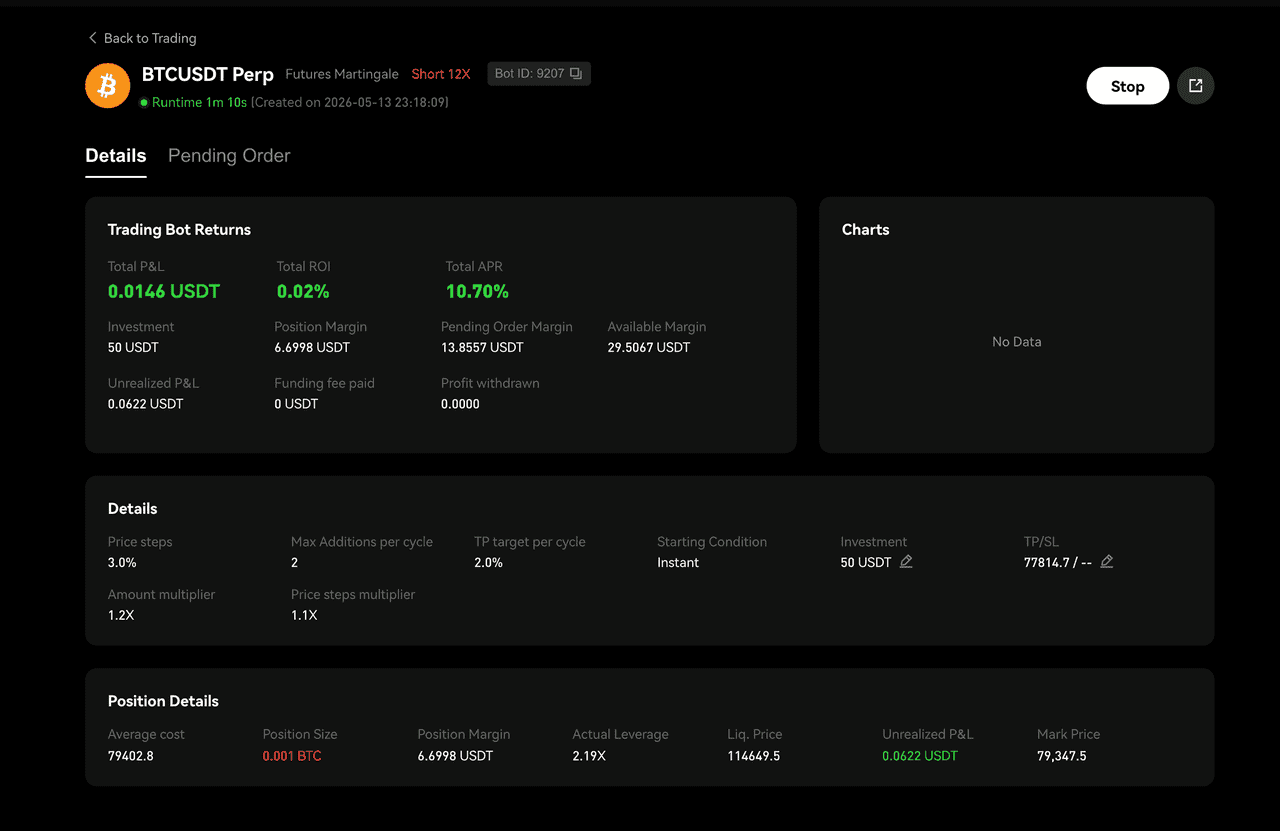
Keep track of your active trading bots by navigating to the activity window below. Click on 'Details' for a comprehensive report on any particular bot.

On the page, you'll find the trading bot's current status, encompassing returns, position specifics, orders, and historical data.
 Submit Ticket